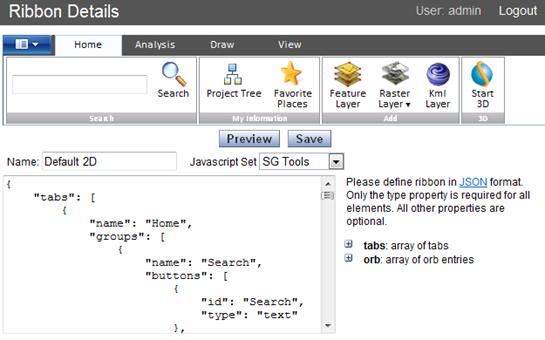
Using the SkylineGlobe Manager, you can easily customize the ribbon, modifying and adding tabs, groups, and commands as required. The ribbon is customized from the SkylineGlobe Manager, Ribbon Details page, using JSON (JavaScript Object Notation) format. See: www.json.org.
JSON is built on two structures:
§ Objects - Sets of name/value pairs. An object begins with { (left brace) and ends with } (right brace). Each name is followed by : (colon) and the name/value pairs are separated by , (comma).
§ Arrays - Ordered lists of values. An array begins with [ (left bracket) and ends with ] (right bracket). Values are separated by , (comma).
A value can be a string in double quotes, or a number, or true or false or null, or an object or an array. These structures can be nested.
Use the following format for the ribbon script:
Note: Only the type property is required for all elements. All other properties are optional.
§ tabs: array of tabs
· name: name of tab
· id: id of element
· contextual: true if tab contextual
· groups: array of groups
¨ name: name of group
¨ buttons: array of buttons
§ type: button/toggle/text
§ id: ID of element
§ name: button text
§ action: Event/ICommand/Tool
§ actionParam: Event name/Command ID/Tool ID
§ commandParam: Parameter to event handler/command param/not used
§ icon: path to icon/sprite name
§ type: dropdown
§ name: button text
§ icon: path to icon/sprite name
§ entries: array of entries
· type: button/toggle
· id: ID of element
· name: button text
· action: Event/ICommand/Tool
· actionParam: Event name/Command ID/Tool ID
· commandParam: Parameter to event handler/command param/not used
· icon: path to icon/sprite name
§ type: list
§ entries: array of entries
· type: button/toggle/text/checkbox
· id: ID of element
· name: button text
· action: Event/ICommand/Tool
· actionParam: Event name/Command ID/Tool ID
· commandParam: Parameter to event handler/command param/not used
· icon: path to icon/sprite name
§ type: select/nativeSelect
§ id: ID of element
§ name: button text
§ action: Event/ICommand/Tool
§ actionParam: Event name/Command ID/Tool ID
§ icon: path to icon/sprite name
§ entries: array of entries
· name: button text
· commandParam: Parameter to event handler/command param/not used
§ orb: array of orb entries
· type: entry
· id: ID of element
· name: button text
· action: Event/ICommand/Tool
· actionParam: Event name/Command ID/Tool ID
· commandParam: Parameter to event handler/command param/not used
· icon: path to icon/sprite name
· type: submenu
· name: button text
· title: title of submenu
· entries: array of menu entries
¨ name: button text
¨ desc: button description
¨ icon: path to icon/sprite name
¨ iconDesc: text under icon
¨ action: Event/ICommand/Tool
¨ actionParam: Event name/Command ID/Tool ID
¨ commandParam: Parameter to event handler/command param/not used
Ribbon Details